Deploying Graph Studio on Kubernetes
Follow the steps below to review the prerequisites and install and configure Graph Studio on Kubernetes.
- Kubernetes Cluster Prerequisites
- Recommended Node Group Configurations
- Prerequisites for Server Deployment
Kubernetes Cluster Prerequisites
It is assumed that the a Kubernetes (K8S) cluster is up and running in the public and/or private cloud and a user can connect to the cluster using kubectl. Currently, the following cloud managed services are supported:
- Amazon Elastic Kubernetes Service (EKS)
- Google Kubernetes Engine (GKE)
- Microsoft Azure Kubernetes Service (AKS)
If you are a cloud administrator and wish to deploy a Kubernetes cluster on any of the public clouds mentioned above, please refer to Setting up K8s Infrastructure for Dynamic Deployments
Recommended Node Group Configurations
See the following topics for recommended node group configurations.
Prerequisites for Server Deployment
Graph Studio in K8S is deployed as a Custom Resource (CR), which is controlled and managed by Custom Resource Definition (CRD) and Operator.
For resource requirements, please refer to Graph Studio Server Requirements
Instance Types
Typically, instance types from the general-purpose or standard series offered by cloud service providers are suitable. Recommended instance types vary based on memory requirements, ranging from a minimum of 64 GiB to a maximum of 256 GiB.
| Cloud | Min Instance Type | Min Instance Type |
|---|---|---|
| AWS | m5n.4xlarge | m5n.16xlarge |
| GKE | n2-standard-16 | n2-standard-64 |
| AKS | Standard_D16s_v6 | Standard_D64s_v6 |
| OpenShift | Please see the note below | |
1. For AKS, see also similar instance sizes in the Dsv5 series.
2. OpenShift: Please refer to the production workload resource requirements as mentioned above. If you are deploying OpenShift on EKS, GKE or AKS, refer to the instance types mentioned in the table above.
Graph Studio Container Images
Get the following docker images for deployment. These are present in two registries, namely Docker Hub and Red Hat Echo System Catalog.
| Component | Docker Hub | Red Hat Container Registry |
|---|---|---|
| Graph Studio Operator | Altair® Graph Studio™ - operator Docker Hub | Altair® Graph Studio™ - operator image - Red Hat Ecosystem Catalog |
| Graph Studio | Altair® Graph Studio™ Docker Hub | Altair® Graph Studio™ - Red Hat Ecosystem Catalog |
Required RBAC and Namespace Configurations
Once you connect to the cluster using kubectl command-line client, you need to create a dedicated namespace for the server deployment and configure Role-Based Access Control (RBAC). This ensures the correct set of namespace-level and cluster-level permissions are attached to the Kubernetes service account that is used to deploy the server.
For namespace and RBAC creation, please refer to the files available at Graph Studio Operator GitHub.
Please make sure to update metadata.name while deploying namespace.
Steps to deploy:
1. kubectl create -f deploy/v1_namespace_default.yaml
2. kubectl create -f deploy/default_v1_serviceaccount_anzo-operator.yaml --namespace
3. kubectl create -f deploy/default_rbac.authorization.k8s.io_v1_role_anzo-operator.yaml --namespace
4. kubectl create -f deploy/default_rbac.authorization.k8s.io_v1_rolebinding_anzo-operator.yaml --namespace
5. kubectl create -f deploy/rbac.authorization.k8s.io_v1_clusterrolebinding_anzo-operator.yaml
6. kubectl create -f deploy/rbac.authorization.k8s.io_v1_clusterrole_anzo-operator.yaml
Applying Custom Resource Definition (CRD)
This is a cluster-level resource or object that extends Kubernetes API or allows you to introduce your own API to the Kubernetes cluster.
Operator is dependent on CRD for Custom Resource deployments.
To deploy CRD, execute the following steps.
1. kubectl create -f deploy/crds/apiextensions.k8s.io_v1_customresourcedefinition_anzos.anzo.cambridgesemantics.com.yaml
2. kubectl create -f deploy/crds/apiextensions.k8s.io_v1_customresourcedefinition_anzobackups.anzobackup.cambridgesemantics.com.yaml
Operator Deployment
Deploy operator using the command
'kubectl create -f deploy/default_apps_v1_deployment_anzo-operator.yaml --namespace<namespace>'
Verify that a pod running in the namespace. Make sure to check the pod logs to make sure there are no errors:
'kubectl create -f deploy/default_apps_v1_deployment_anzo-operator.yaml --namespace<namespace>'
Deploy the Graph Studio Server as a Custom Resource
After namespace, RBAC, CRDs and operator pod have been successfully initialized, deploy the Graph Studio server in the same namespace.
The command to deploy:
kubectl apply –f <cr-filename>.yaml --namespace <namespace>
Refer to the use cases in the next section to deploy the server according to your needs.
Use Cases
Persistence
Allowing Graph Studio to persist data has the following benefits:
-
We can get state consistency across redeployments and reboots.
-
No need to reiterate on the configurations
-
In case of accidental pod deletion, it’s very easy to recover from the last data point that is saved.
-
Need not worry about the data loss during version upgrades.
To preserve the state and data of Graph Studio, there are a few directories which we need to preserve. These are:
-
Kubernetes container activation state directory
-
Server’s data directory where the journal is stored
-
Logs
-
License or license tokens
The following reference CR takes care of data persistence.
When deployed, it creates a Persistent Volume (PV) and a Persistent Volume Claim (PVC) where the data is stored.
Licensing
Graph Studio operator 6.0 supports two types of licensing
-
Altair Units Licensing (recommended).
-
Cambridge Semantics license keys (supported for a limited time as a legacy licensing method).
To specify licensing at the bootstrap time of Graph Studio, we need to specify a set of parameters in the deployment YAML file section spec.Licensing
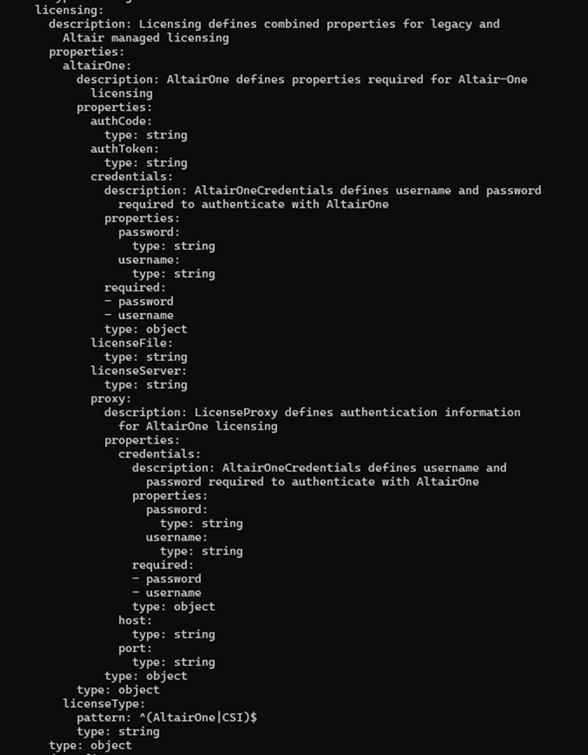
There are multiple ways to specify license credentials, depending on the setup / account that you have. Altair Units Licensing provides two options: Managed Licensing (with license hosted in the Altair cloud) and self-hosted Altair License Server. Cambridge Semantics legacy license is also supported for a limited time to ease the transition to the new licensing system for existing customer. The following configuration settings are supported:
-
spec.licensing.altairone.credentials- For Managed Altair Units Licensing, you can specify Altair One account credentials here (basic authentication using username and password). -
spec.licensing.altairone.authCode- Alternatively, with Managed Altair Units Licensing you can generate an authorization code from the Altair One account profile and use it to deploy the server. -
spec.licensing.altairone.proxy- HTTPS proxy details for Managed Altair Units Licensing. If an HTTPS proxy is used, specify the proxy host and port, proxy username and password (if applicable). -
spec.licensing.altairone.licenseServer- Self-hosted (on-premises) Altair License Server address in the form of<port>@<server_name_or_IP_address>. -
Cambridge Semantics legacy license file can be specified in the file
/opt/anzo/Server/configuration/firstbootFiles/init.jsonunder the key'licenseEncoded'. (Not recommended)
Examples
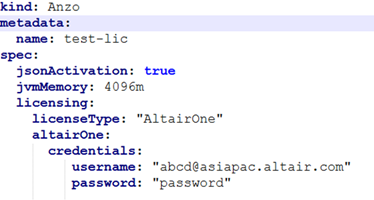
Managed Altair Units Licensing configuration with Altair One credentials specified:
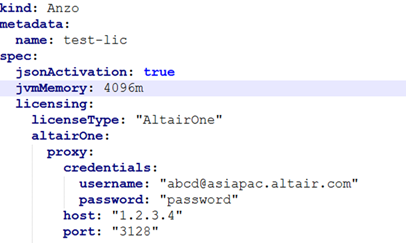
Managed Altair Units Licensing configuration with HTTPS proxy specified:
Upgrade
-
Patch version upgrade is supported for Graph Studio operator version 3.1.0 and higher.
-
Supported version bracket – Graph Studio [2025.0.0 - 2025.0.1]
-
Current implementation relies on fully qualified image tags which can be specified in the following format:
-
Major.Minor.Patch- e.g.docker.io/cambridgesemantics/anzo:6.0.0 -
Major.Minor.Patch-<release-type><release-timestamp>e.g.
6.0.0-n202504041800-b20250409030000 -
Major.Minor.Patch-<release-type><release-timestamp>-b<build-timestamp>e. g.
6.0.0-n202504041800-b20250409030000 -
Please note that a SHA256-based image tag cannot be used for the update at this time. This will be supported in a future version of Graph Studio.
-
1. It is always recommended to upgrade to the next stable patch version of Graph Studio. Version downgrades are not recommended even if it is a patch version.
2. To force the upgrade to a specific version, add the following annotation to Graph Studio CR
altair.com/apply-force-upgrade: “true”
3. Version identification in OpenShift based on the Image API is currently not supported. This feature will be implemented in a future version of Graph Studio.