Retrieving Graph Lakehouse Diagnostic Files
When Cambridge Semantics Support requests Graph Lakehouse diagnostic files for troubleshooting an issue, you can quickly retrieve the files from the Diagnostics tab on the Graph Lakehouse page in the Graph Studio Administration application. This topic provides information about the Graph Lakehouse diagnostics and instructions for retrieving the files.
If the Administration application is unavailable, you can retrieve the diagnostic files with the Graph Lakehouse system manager. See Taking Graph Lakehouse X-Rays from the Command Line for instructions.
Diagnostic File Details
There are two types of Graph Lakehouse diagnostic files:
- XRay: XRays are generated on-demand. If you encounter an error and the database remains running, you generate an XRay to produce the diagnostic files.
- Crash Dump: If you encounter an error that crashes the database, Graph Lakehouse automatically generates a crash dump that contains diagnostic information about the crash.
Xrays and crash dumps are valuable tools that enable Cambridge Semantics to diagnose and fix issues without access or any other visibility into a customer’s data or database system. They can also be used to report on overall and detailed system performance, resulting in improved query performance for future releases of Graph Lakehouse.
Xrays and crash dumps harvest the diagnostic data that is stored in Graph Lakehouse's system tables. They include information such as:
- A low level, de-identified log of the requests that were sent to the database.
- Statistics like query operation step execution times, number of rows processed, and amount of memory used.
- Detailed but de-identified trace information for errors that were encountered.
- Configuration information such as the number of nodes in the cluster and Graph Lakehouse system settings values.
Xrays and crash dumps are designed to be anonymous and can be safely shared with Cambridge Semantics Support. They do NOT capture user information or any of the data that is loaded into memory by a user, nor do they expose details that could be used to reveal the nature of the data being queried.
Retrieving the Files
Follow the instructions below to download an xray or crash dump to send to Cambridge Semantics Support.
- In the Administration application, expand the Connections menu and select AnzoGraph. The Graph Lakehouse screen is displayed and lists the connected Graph Lakehouse instances.
- Click the name of the Graph Lakehouse instance for which you want to download an xray or crash dump. Graph Studio displays the Graphmarts screen for the instance.
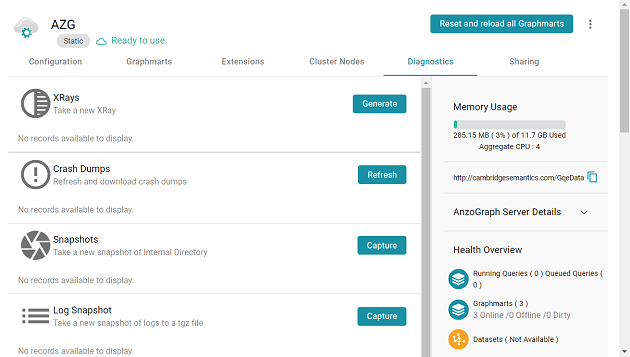
- Click the Diagnostics tab. Graph Studio displays the available options. For example:
- If you want to retrieve an xray, click the Generate button for Xrays. Graph Studio creates the xray and produces a tarball with a .xray extension. For example:
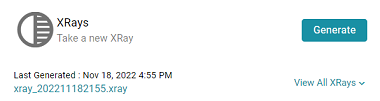
Click the xray file name to download the tarball to you computer for sending to Cambridge Semantics.
The files in the tarball are compressed. Do not compress the .xray file before sending it to Cambridge Semantics.
- If you want to retrieve a crash dump, click the Refresh button next to Crash Dumps to refresh the list of available crash dump files. Click the file name that you want to download. Graph Studio downloads the file to your computer.