
View Storage Details
Only Site Admins can access all user data, manage storage, and view detailed usage data.
- Manage Drive storage settings account of an organization.
- Monitor physical disk space.
- View total account storage capacity, current usage of all users.
- Usage breakdown of all users in the account.
- Export storage usage reports to share with users.
- Set alerts when storage nears capacity.
-
Click Settings on the left pane and then select the
Storage tab.
The Storage tab displays total account storage for an organization which includes used storage space and available storage space of all users.
Figure 1. Account Storage 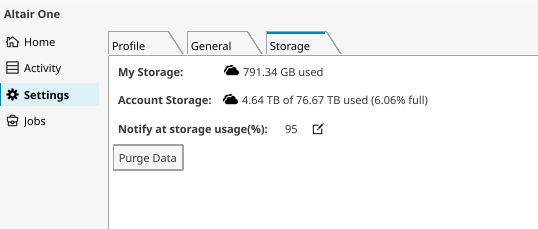
-
Click Edit
 to change the notification trigger, Use the arrow
keys to update the percentage of storage usage to send notifications.
to change the notification trigger, Use the arrow
keys to update the percentage of storage usage to send notifications.
-
Click Usage Breakdown. A list of users using the account
storage is displayed. The list starts with power users consuming significant
storage and their email IDs are provided.
This helps admins reach out to users to cleanup obsolete or unused data, and duplicate data.
Figure 2. Usage Breakdown 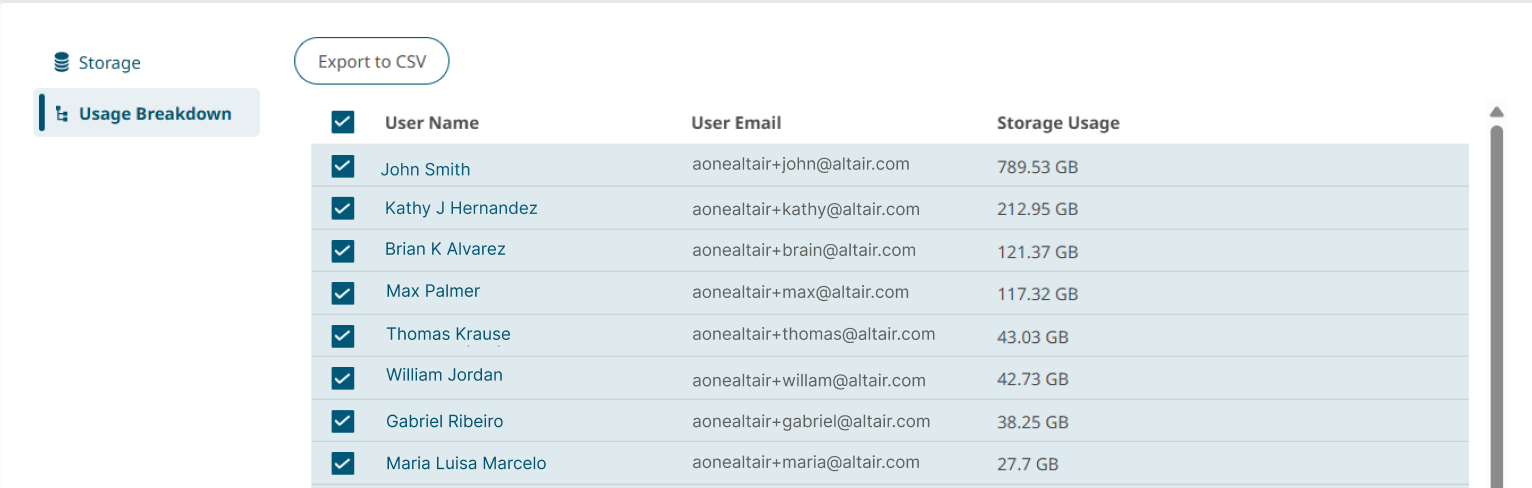
-
Hover over a file or folder, click
 . A
window opens to the right of the file.
. A
window opens to the right of the file.
-
Hover over a file or folder, click