Create .json Files
Tutorial Level: Intermediate In this tutorial, you will generate .json files for training a PhysicsAI model on custom outputs/KPIs from a .csv file summarizing the KPIs of the entire dataset.
These .json files should be created prior to creating a dataset inside PhysicsAI and you are free to use the method of your choice. The KPIs need to be supplied through .json files in addition to the solver result files (.h3d, .odb, and so on) or solver input decks (.fem, .rad, and so on) in the same subdirectory and have the same name (for example, A.h3d and A.json, B.h3d and B.json, and so on).
For information on using custom outputs during training, see the Custom Outputs/KPIs in PhysicsAI Models tutorial.
Before you begin, copy the file(s) used in this tutorial to your working directory.
Unzip the project creating_jsons.zip and inspect the contents:
- collected_data.csv is a comma separated file which contains a summary of the relative file paths of the various .h3d files and the corresponding KPIs.
- physicsai_csvtojson.py is a python script that reads the .csv file above and generates .json files in the same relative location as the .h3d files listed in the .csv.
- run_000XX_beam.h3d files provided in different locations within the attached folder.
In this tutorial, you will:
- Update a .csv file with your KPIs.
- Generate .json files corresponding to each of the provided .h3d files.
Create Files
In this step, you will create .json files which contain the KPIs corresponding to the .h3d files.
-
Open the collected_data.csv file.
This file summarizes the relative locations of the different .h3d files provided. Also, the KPI values corresponding to each .h3d file are listed in the columns with an appropriate header. Anyone can edit this file to add or remove KPIs.
Figure 1. KPI Summary Contained in the CSV File 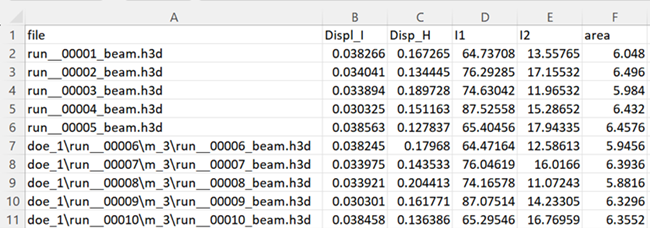
- Verify the relative path to the .h3d file is correctly input in the first column and that each .h3d has all the KPIs defined.
-
Run the physicsai_csvtojson.py file.
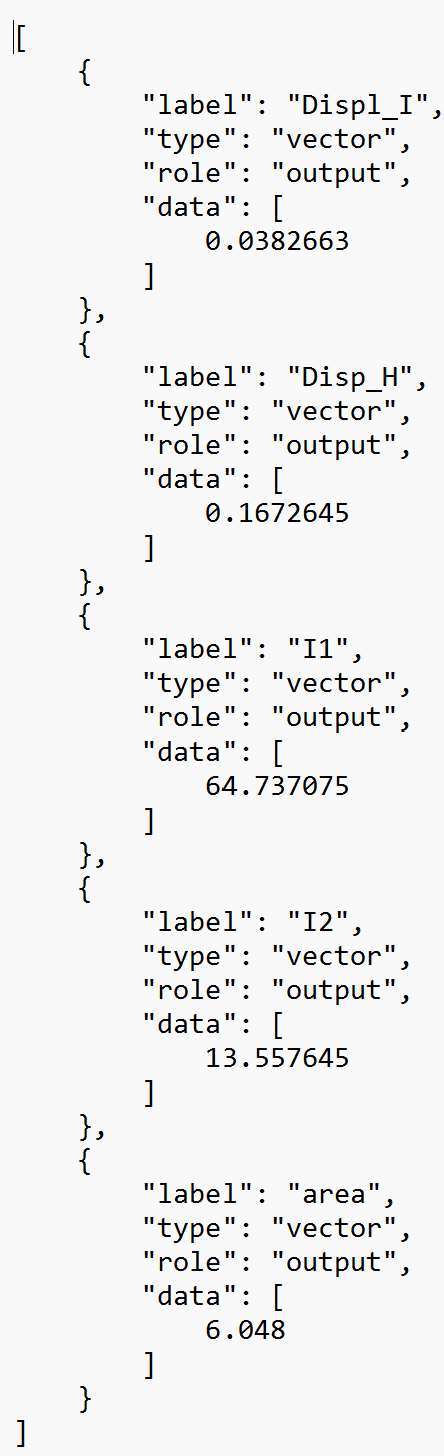
This file generates the .json files which contain the KPIs in a structured format. Each .json file has the same name as the corresponding .h3d file except that the extension is .json.
Figure 2. Example .json File