
Reflect Skeleton Entities Using a Symmetry Plane
Use the Symmetry tool to reflect and map joints and members using a plane.
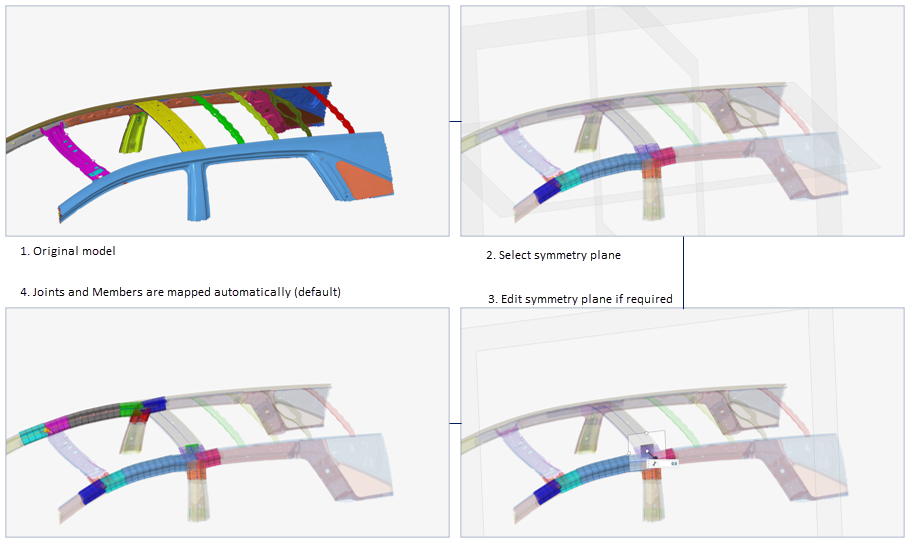
-
From the Skeleton ribbon, click the Symmetry tool.
図 2. 
-
Select an existing symmetry plane, or:
- Click Create New.
- Select the axis for the plane.
- Use the Vector tool to further position and align the plane.
- オプション: To manually select which entities to reflect, uncheck All Skeleton Entities.
- オプション:
Click
 on the ガイドバー to define
how properties are managed.
The existing properties can be applied to the symmetric 1D elements, or, if this option is enabled, it creates new properties. This is useful depending on how the optimization will be performed.
on the ガイドバー to define
how properties are managed.
The existing properties can be applied to the symmetric 1D elements, or, if this option is enabled, it creates new properties. This is useful depending on how the optimization will be performed. -
ガイドバーで、下記のオプションのいずれか1つをクリックします:
 - 適用し、ツールを開いたままにする
 - 適用し、ツールを閉じる
 – 適用せずにツールを終了する