
Download Single Material Pair Data
Download simulation-ready single material pair data from SMDC Stick-Slip database to Squeak and Rattle Director (SnRD).
- On the SMDC home page, click .
-
Select a material pair and then click
 Details.
An Info tab opens to the right displaying the general information of the selected material pair.Note: Click
Details.
An Info tab opens to the right displaying the general information of the selected material pair.Note: Click to view the material information in full screen
mode.
to view the material information in full screen
mode. -
Click the CAE Model tab.
The Select Software displays Squeak and Rattle Director as already chosen.
-
Select a scenario from the Scenario list. By default,
the Worst Case Scenario is chosen.
Figure 1. Material Pair Preview 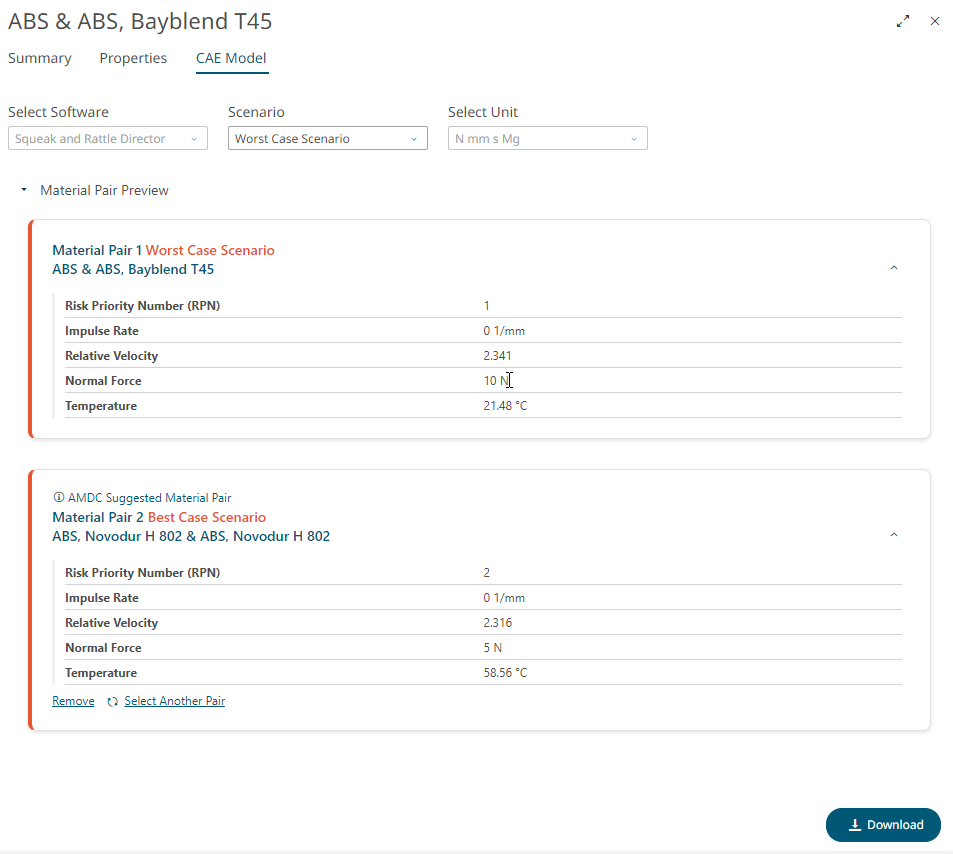
The Material Pair Preview displays the following:- Material Pair 1 Worst Case Scenario (selected by default): Displays important material properties including impulse rate value for the worst-case scenario for the selected material pair.
- Material Pair 2 Best Case Scenario: Based on your selection, SMDC suggests the opposite scenario. In the current example, SMDC suggests best-case scenario with lower impulse rate value and other material properties for the same selected material pair.
-
To download only a single pair of the selected scenario material data, click
Remove from Material Pair 2 preview.
Figure 2. Remove Material Pair 2 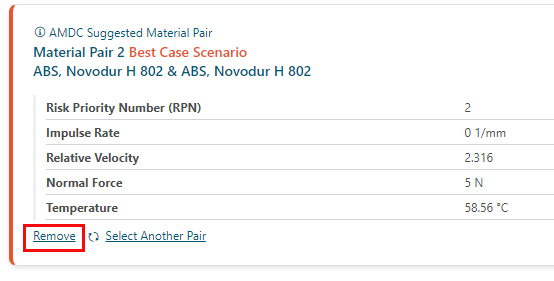
The second material pair suggested by SMDC will be removed. -
Click Download to export the material pair data as a
CSV file to the SnRD director.
Figure 3. Download Single Material Pair Data 
Table 1. Exported single material pair CSV file details Column Name Description Source Indicates the name from which the data is sourced. Name Displays names of a material pair. For example, ABS & ABS+PC, Bayblend T65. Material 1 Displays the first material name of the selected pair. Material 2 Displays the second material name of the selected pair. RPN Displays the RPN value. The same value is repeated after the hyphen for the material pair. Inv(IR) Displays the inverse impulse rate value. The same value is repeated after the hyphen for the material pair. Relative Velocity Displays the relative velocity value. The same value is repeated after the hyphen for the material pair. Normal Force Displays the normal force value. The same value is repeated after the hyphen for the material pair. Temperature Displays the temperature value. The same value is repeated after the hyphen for the material pair. Note Indicates the traceability (any changes made to the original dataset) of the data.