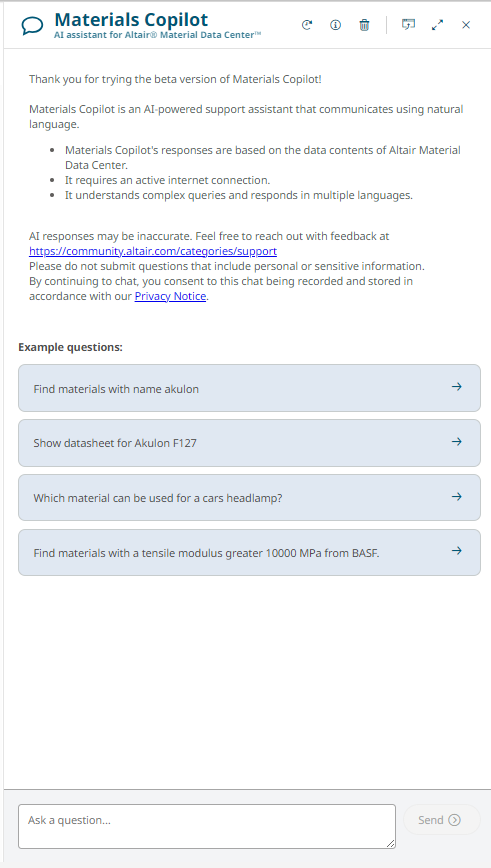
Materials Copilot is an interactive, AI-powered chat assistant where the users
can query the database using natural language. It is able to understand complex queries and
find materials matching the users requirements.
Figure 1. Materials Copilot
Materials Copilot Menu Options
The Materials Copilot menu gives you quick access to manage
your chat history and customize panel layout within the application. Use these
options to ask questions, review previous conversations, and adjust the Copilot
window to suit your workflow.Figure 2. Materials Copilot Menu
In the top-right corner of the application window, click
Materials Copilot.
In the Ask a question field, enter a question and press Enter
or click the Send button to submit
it.
Note:Materials Copilot
keeps track of the current and last question, so when you ask a
follow-up question, you can assume it remembers the last question and
response.
Click Load Conversation to load your previous questions from your
active chat.
Click Toggle Info
to toggle information from your active chat.
Click Clear chat historyto remove a question from your history.
Click Undock Panel to undock or reposition the window to another
location within the application.
Click Dock Panel to reposition to its original location.
Click Close Close to close Materials
Copilot window.
Knowledge Resources
Materials Copilot uses an active internet connection to
process your questions and can only return answers based on data contained in SMDC and some additional knowledge resources, such as
the Altair
Community Knowledge Base, Altair How-To video libraries, and
Altair Learning materials, for example. It understands and responds in multiple
languages, with the input language detected automatically. The coverage of Altair's
knowledge resources is continuously expanding.
Note: Please do
not submit questions that include personal or sensitive information.
In contrast with other AI chat solutions, the hallucination phenomenon—where the AI
invents non-existent answers—is vastly minimized due to its constrained context
approach. However, it can still retrieve an incorrect answer or fail to find the
answer, depending on the specific qualities of the question and
Altair’s
own data sources.


 .
. to submit
it.Note: Materials Copilot keeps track of the current and last question, so when you ask a follow-up question, you can assume it remembers the last question and response.
to submit
it.Note: Materials Copilot keeps track of the current and last question, so when you ask a follow-up question, you can assume it remembers the last question and response. to load your previous questions from your
active chat.
to load your previous questions from your
active chat. to toggle information from your active chat.
 to remove a question from your history.
 to undock or reposition the window to another
location within the application.
to undock or reposition the window to another
location within the application. to reposition to its original location.
 to close Materials
Copilot window.
to close Materials
Copilot window.